Vukoli
An AI interview coach that runs on your own computer, with its design system linked between Figma and Storybook
- 2026
- Product, design and build
- Own product
- Solo
The task. Practising a job interview out loud, in English, when English isn't your first language, with a coach that runs on your own computer.
What I did. I took Vukoli from a personal tool to a product: research, a name, a logo, a design system in Figma and Storybook, the app itself and installers. I ran it through Project Builder, my own pipeline for Claude Code, and made the call at every gate. To carry the design system between Figma and code I built a bridge plugin and a set of skills.
The result. A public open-source app for macOS and Windows, released four days after the brief and now at v0.2.2. One design system, the same component names in Figma and in Storybook, light and dark, and not one value out of sync between them.
- Local first
- No real users yet
- Figma on Starter
- Solo
The product
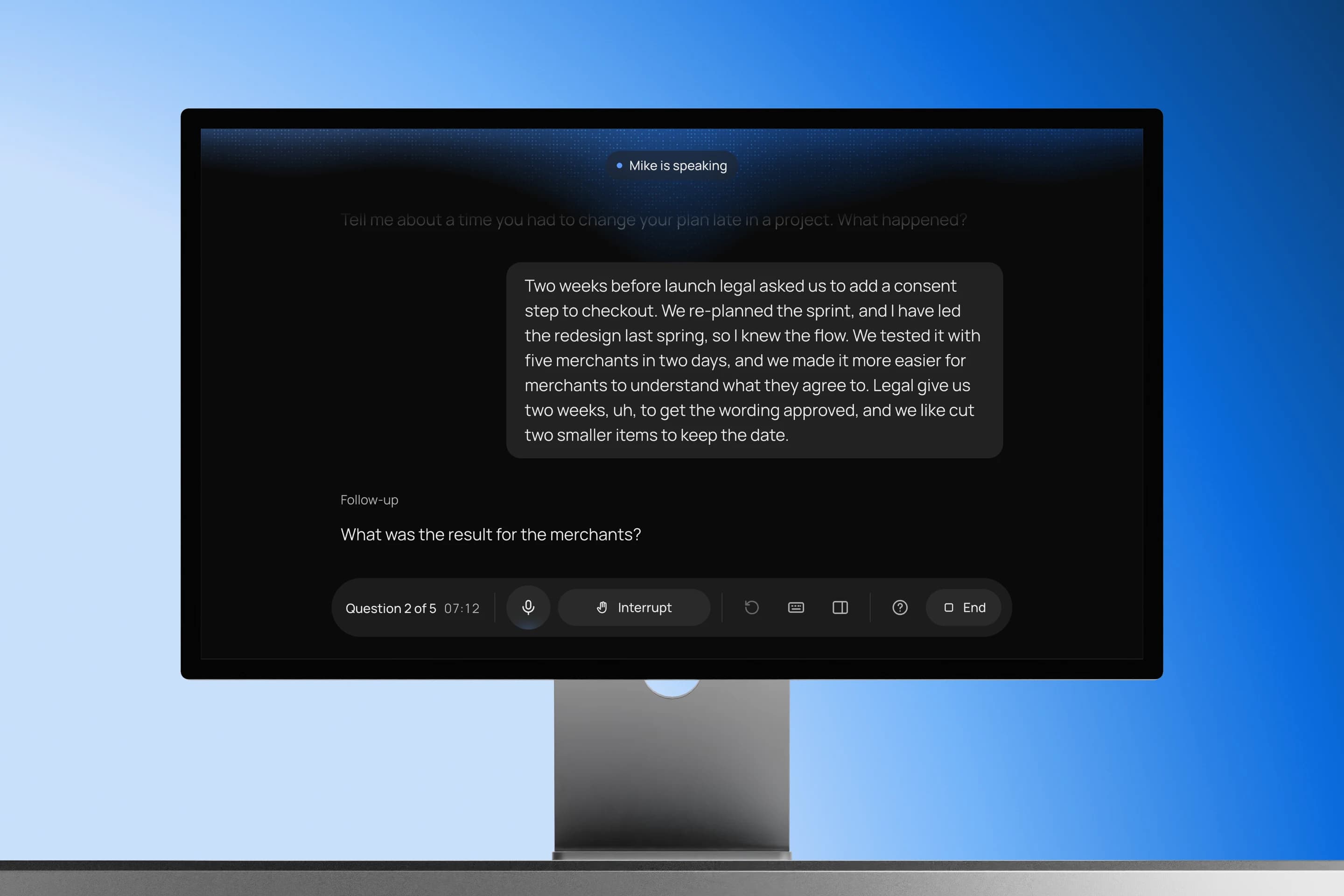
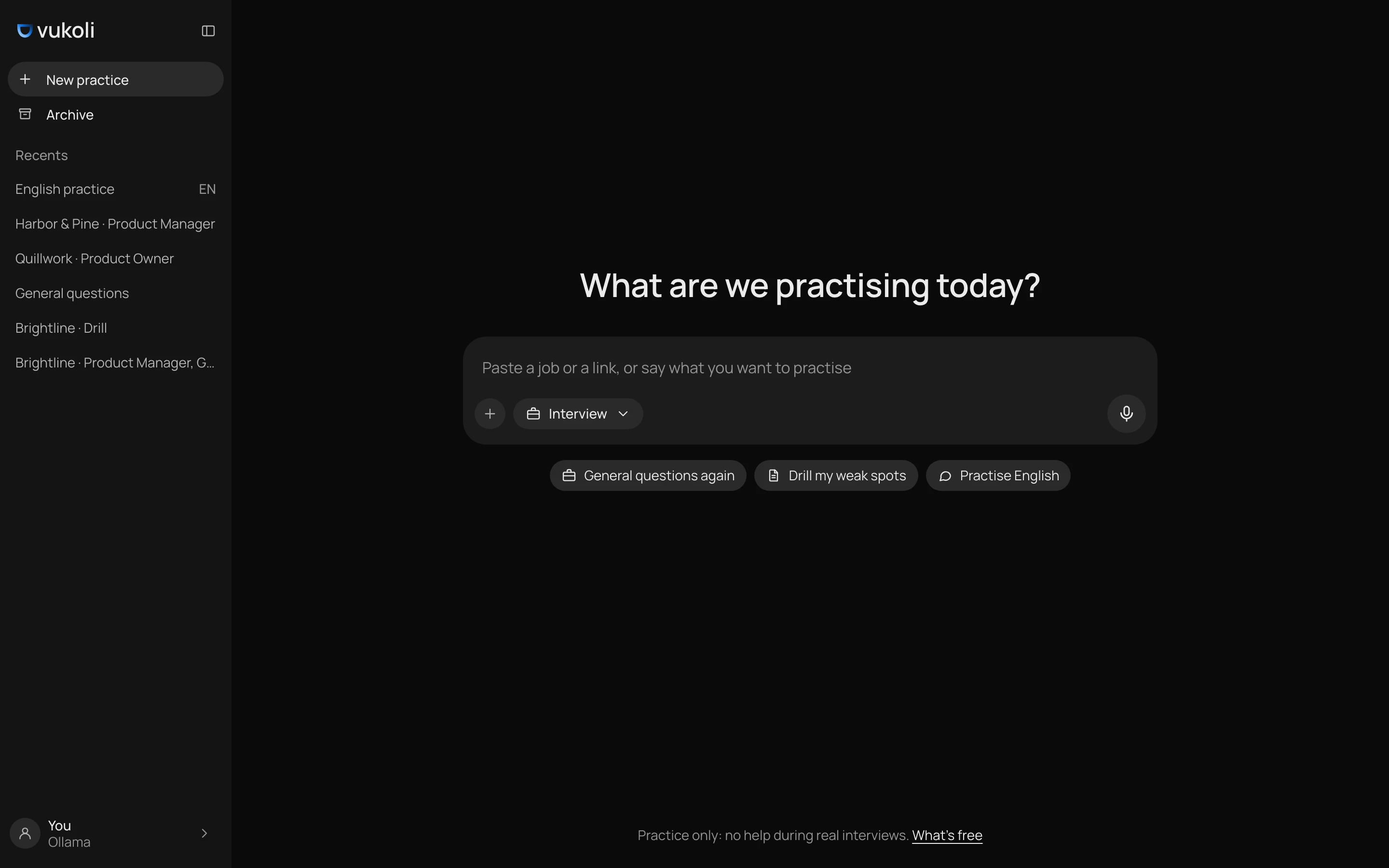
You paste a job posting, or say what you want to practise. Mike, the interviewer, sets up the round, asks real questions and follows up like a person would. After the call comes a debrief across content, English and delivery.
The session opens on the debrief: a verdict, the reason for it and one final score, the average of the scored skills. Below it sits a plan of up to three steps with one primary button, Drill. Then the questions, one at a time, each with its own list of feedback. This is v0.2.2, five days after the first release.
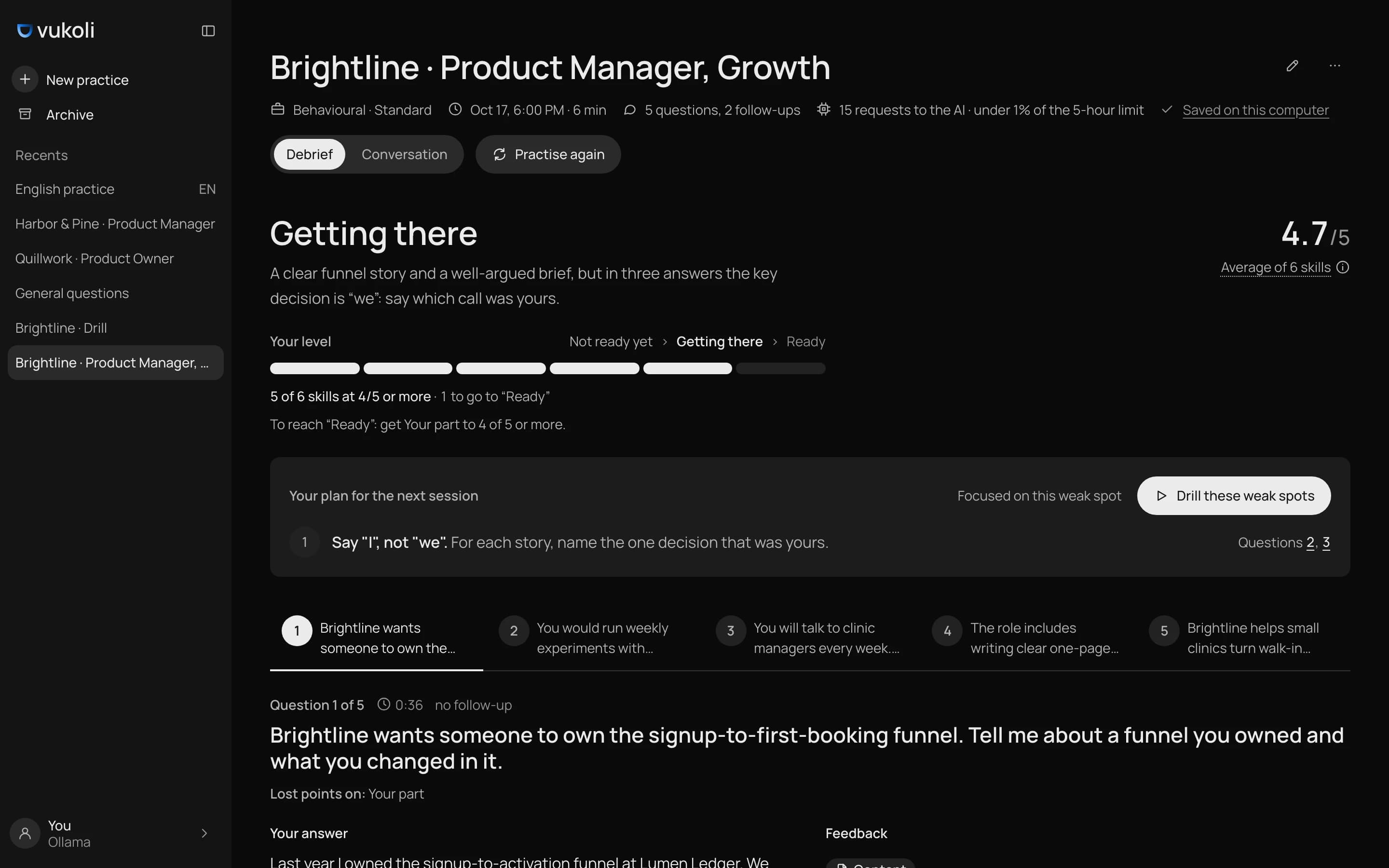
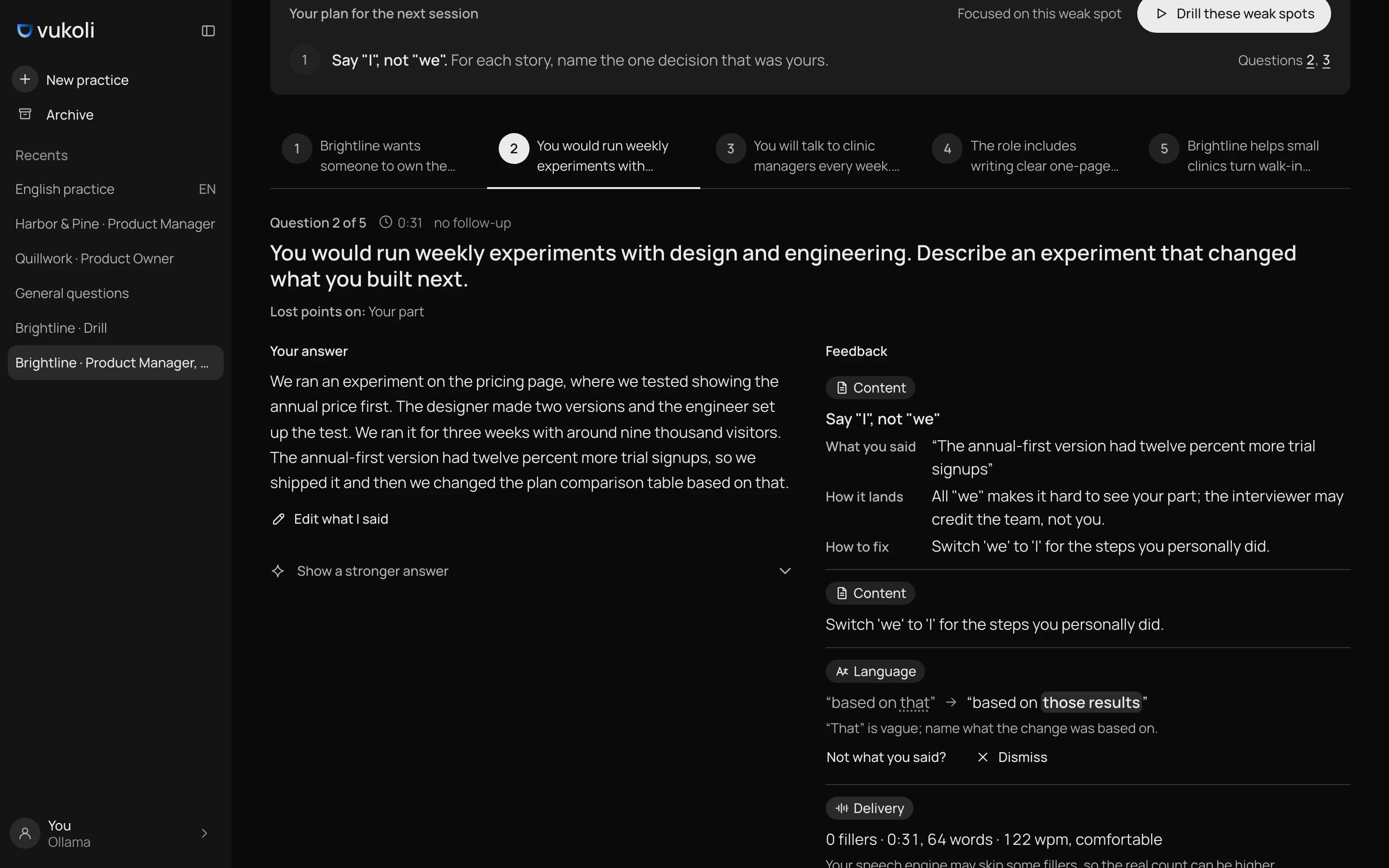
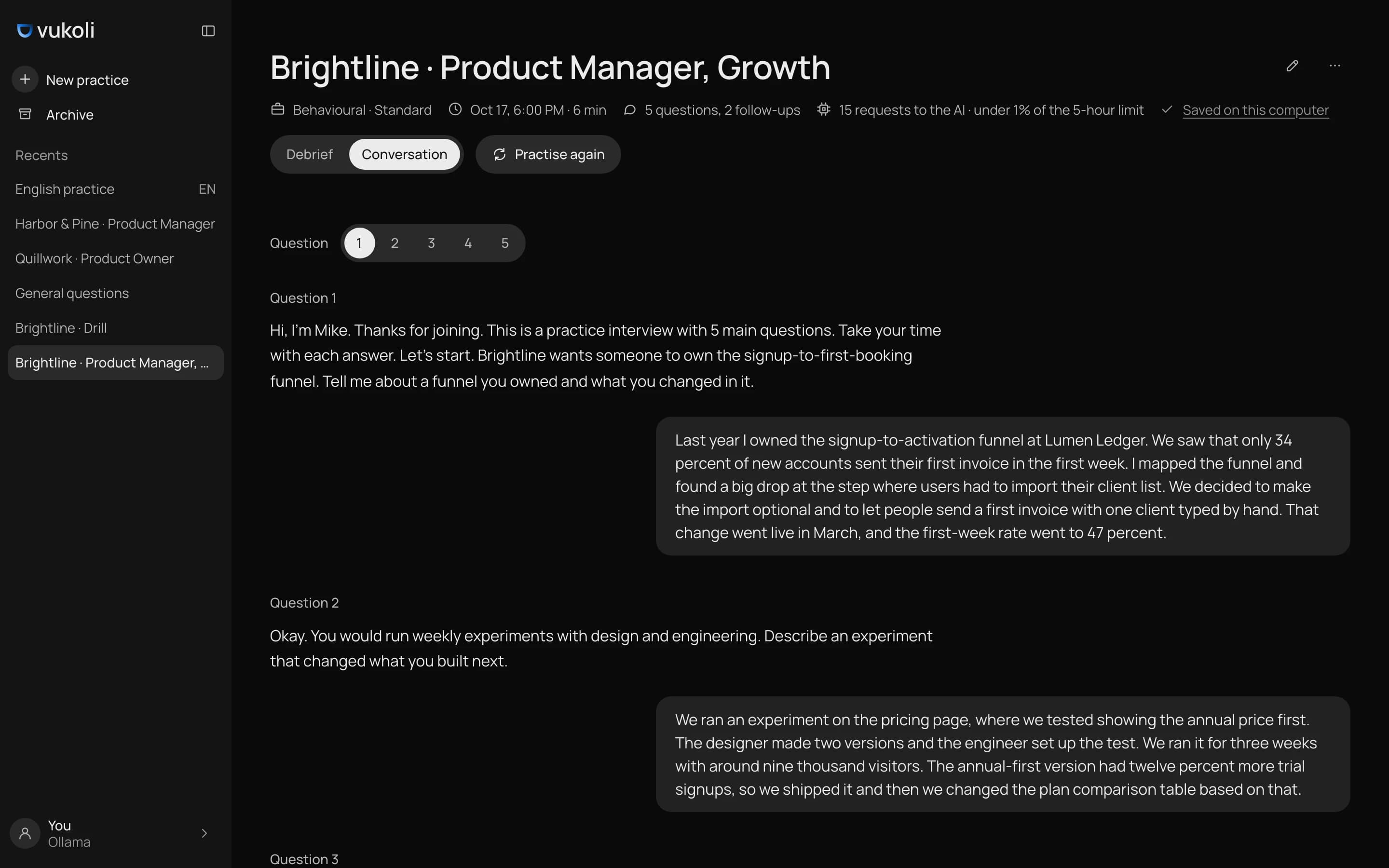
It runs on Ollama, any OpenAI-compatible server, the Claude Code, Codex or Antigravity CLI, or Gemini Live with your own key. Sessions stay on the machine as JSON and Markdown. The code is on GitHub under AGPL.
Light and dark
Light and dark come from the same tokens, so every screen and every component story exists in both. In v0.2.2 the light theme turned inside out: a white sidebar, cards and composer on a grey canvas. Dark stayed as it was. Both themes are monochrome, with blue saved for the moments that matter.
Chat motion
I brought the motion back from the first version of the app: a hard ease-out with no springs, shifts of 6 to 16 px, exits faster than entrances. Mike's scripted replies come without typing dots. Dots and shimmer show only while real work runs, like reading a file or preparing questions, so the app never fakes thinking.
During the call a glow along the top edge shows who is talking. It's there only while someone speaks or Mike thinks. Five lobes follow the voice, and thinking is a crest of light sweeping side to side. It replaced the orb from the first designs. While you talk every loop pauses, and with reduced motion each state is one still frame.
How I run a project
Vukoli is the first project to go through Project Builder from the brief to a public release. Project Builder is my template for product work: the rules I follow as a product designer and front-end developer, written down so Claude Code can follow them too.
- Directives
- Brief
- Pick the next stage
- Agents run the stage
- A page per stage
 Approve the phase?
- Retro
- v0.1.0 on GitHub
Every stage ends with a page I can read in a minute and send to anyone: what was done, the numbers and the open questions. My decisions get numbers, D1 to D101 so far, so any change in the code points back to a decision.
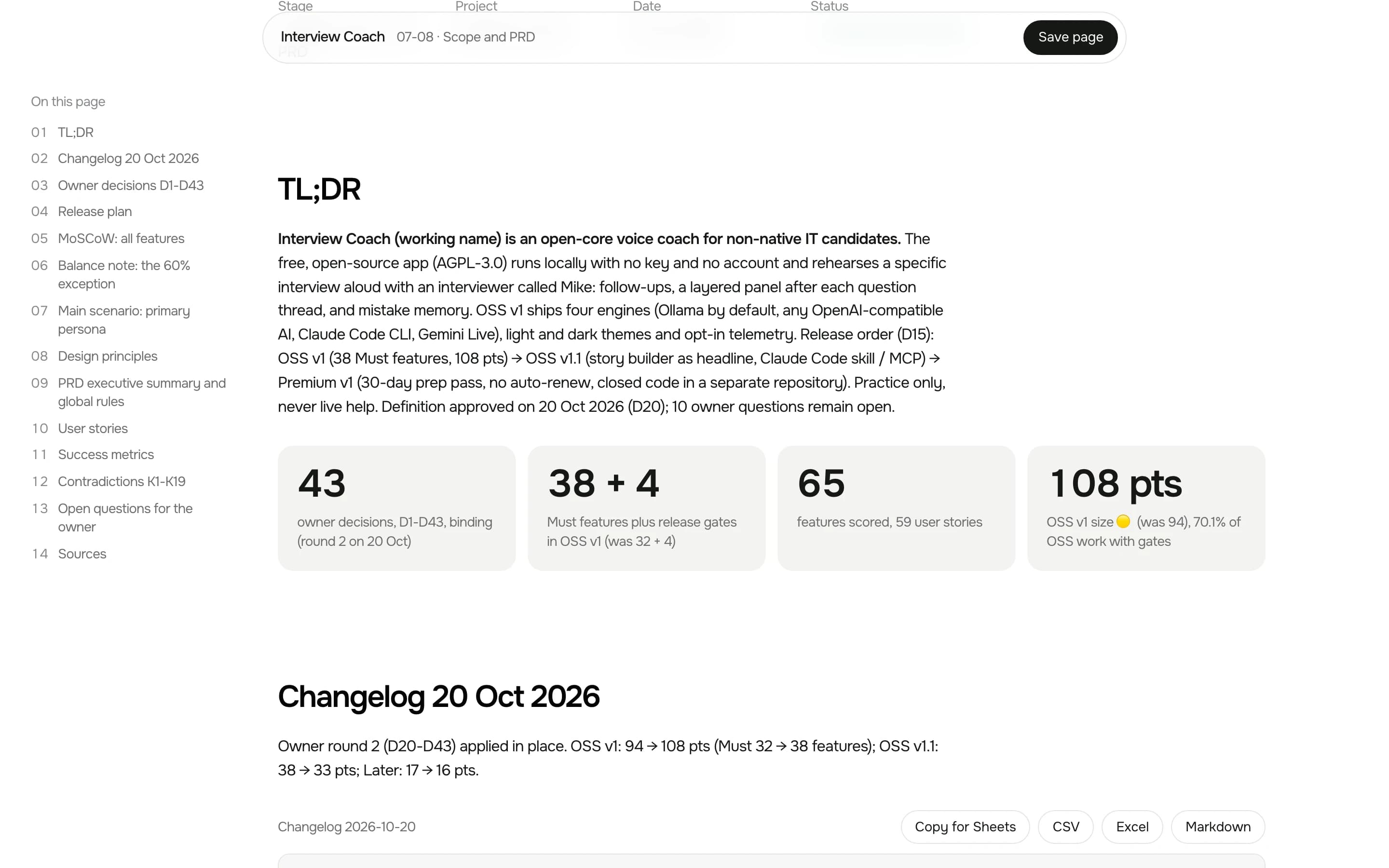
Timeline
Vukoli went on the redesign track of the pipeline, because a personal tool already existed. Every phase ended at a gate I had to approve. The IA started before its gate because I wanted speed, and the retro called it out.
- Discovery
- Definition
- Design
- Build
- After release
Research
The audience is IT people who interview in English as a second language. Before the PRD I ran competitors, a UX audit of a similar product, proto-personas and simulated interviews with them. Each step is a skill I wrote earlier: competitive-research, ux-audit, proto-personas and simulated-interview.
Simulated interviews test hypotheses, they don't confirm them. The only live test so far is me using the app before my own interviews.
Design review
I don't start screens in Figma. They're built in code from the design system's tokens and components, and a review page shows each one with a comment field under it. I leave comments, copy them all in one click and paste them back. The next version answers every comment.
- 47Decisions
- 36Versions
- 0Calls
I turned down v1 whole. It was laid out from the PRD's feature list, and I wanted a chat, like ChatGPT or Ollama. From v2 on, home is a greeting, one field and up to three suggestions.
The name
- 12Candidates
- ~150Domains
- ~350One-word names
- 1Vukoli
The logo
The logo took six rounds with Claude. I turned down two rounds of symbols, then drew the lockup and the icon myself as sketches, and the final grew out of them.
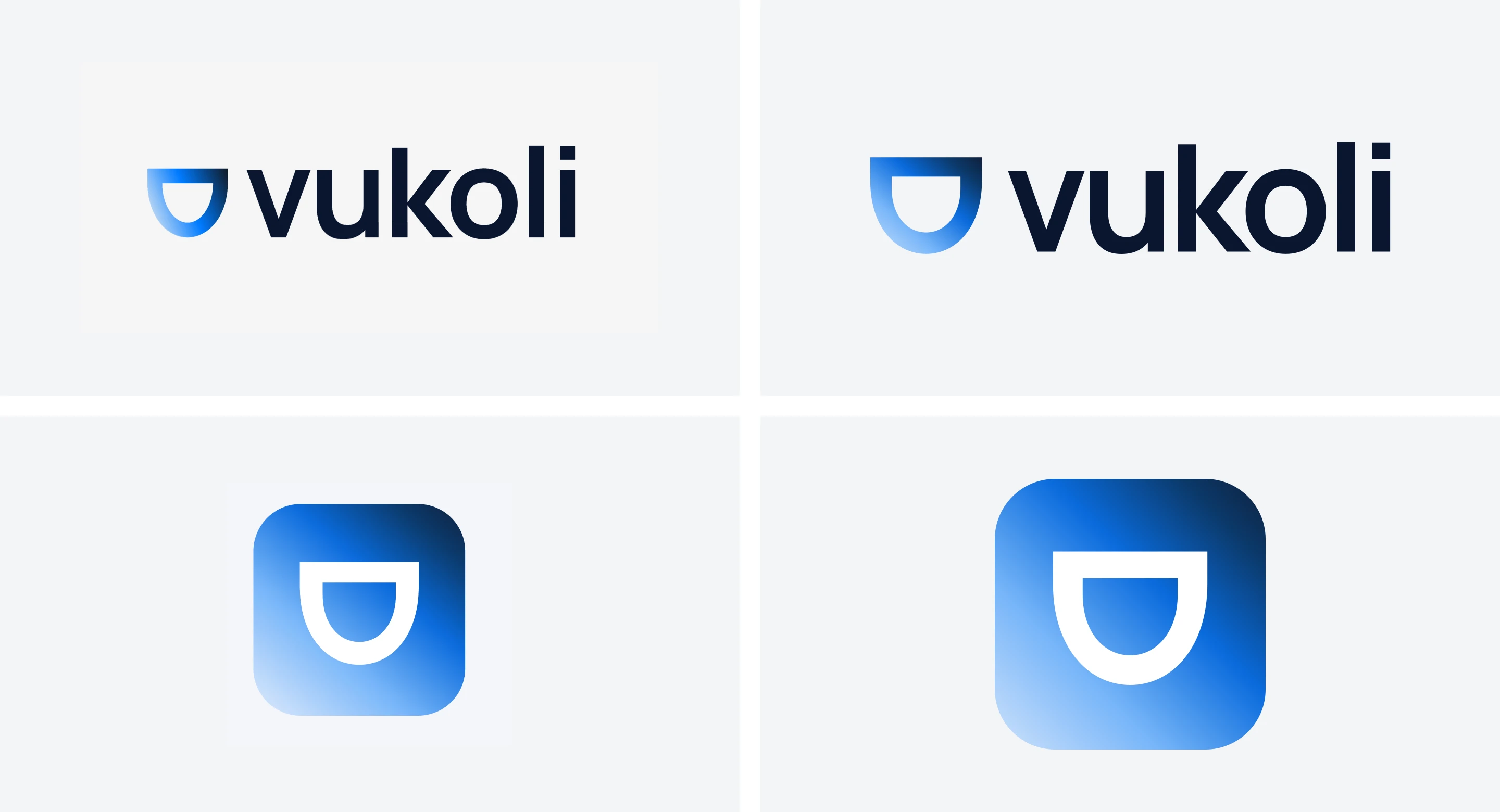
The mark is a rounded shield, filled with one gradient from pale sky to deep navy. The wordmark is Manrope Bold with tight tracking. A check against 1,400 logos found Vuetify, Vue and Vitest closest.
Figma and Storybook
The tokens live in one file in the W3C format and compile to CSS. 142 text and background pairs pass 4.5:1. Then I moved the system onto Untitled UI PRO: names from Untitled UI, values from Vukoli. That's 80 colour roles, 23 of them with Vukoli values and 29 extra ones the kit doesn't have.
There are 42 components in code. In Figma, 18 sets are adapted from the kit and 25 are built for Vukoli. Every set has the code name and its story in the description, and a link to the story. About 40 shots compare Figma with Storybook in both themes. After an audit I rewrote the stories for 31 components.
Storybook holds 548 stories: every component with its states, and every screen state the app can reach. Props are live controls, and a toolbar switch flips the theme.
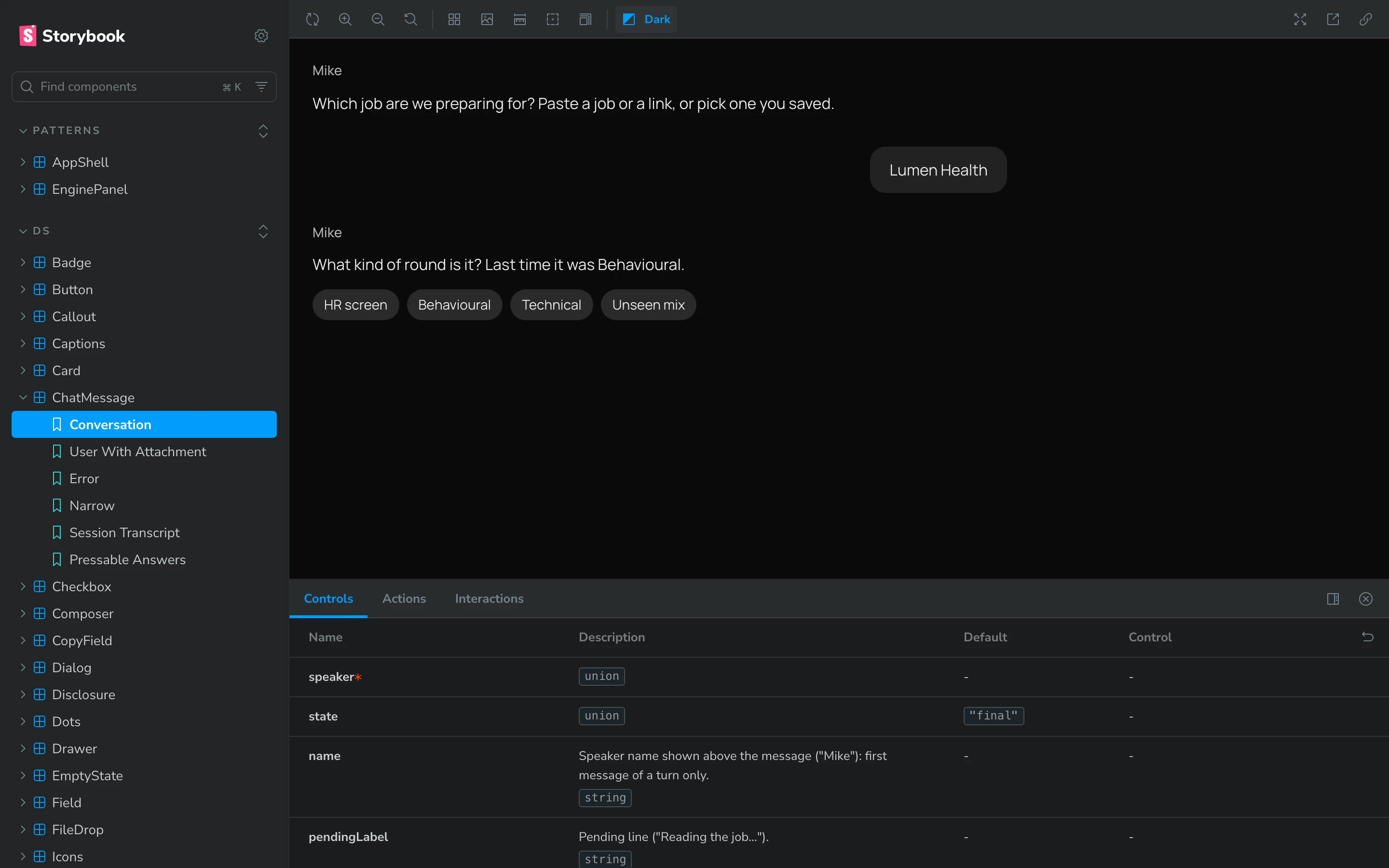
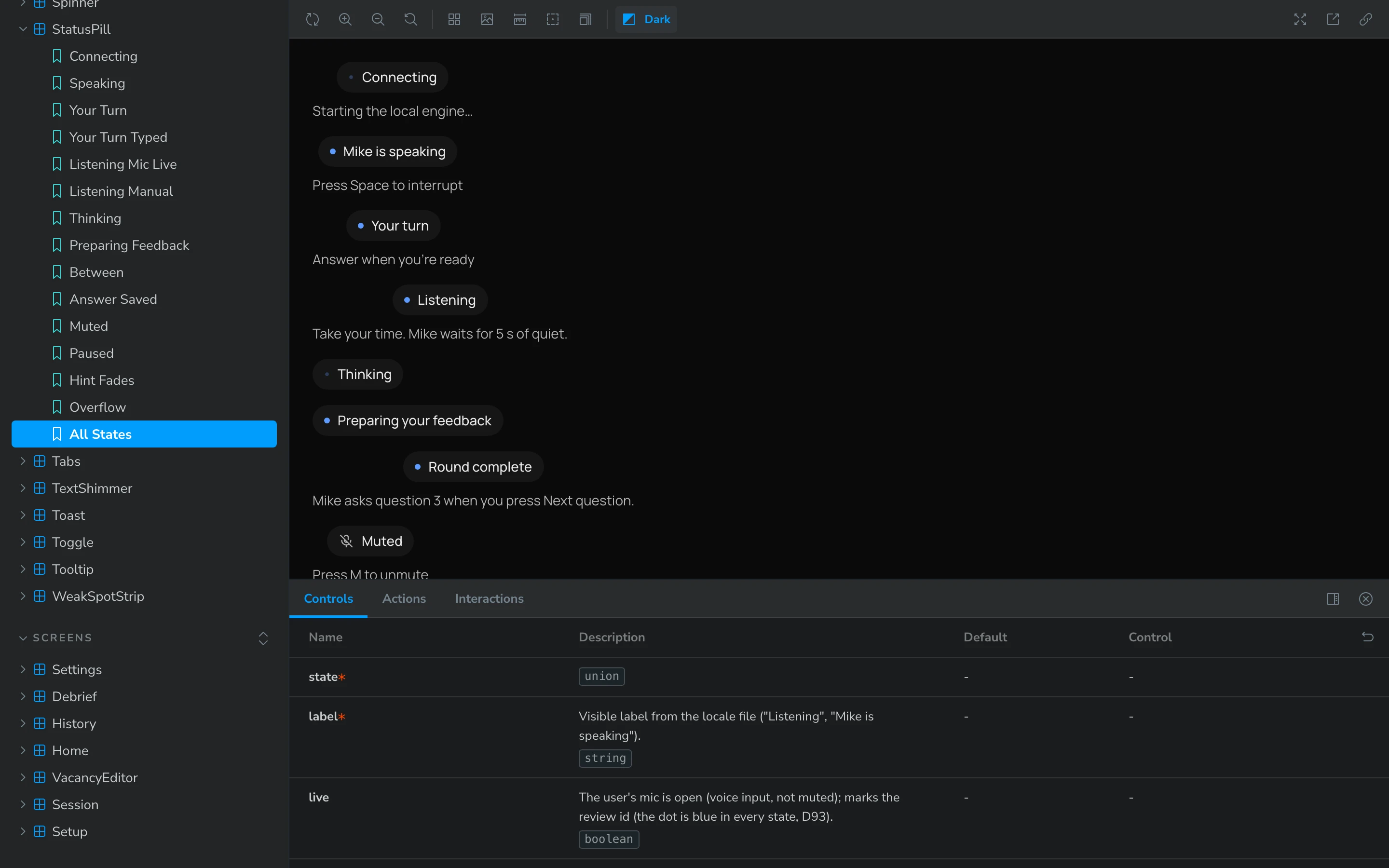
The link itself comes from my figma-storybook-sync skill. On Vukoli it hit a flat folder layout it didn't know, and after the fix it covered 41 components instead of 0.
The bridge
Adapting a design system means hundreds of writes to Figma. Through the MCP on Starter that's a call limit and 48 KB per answer. So I wrote a bridge: Figma runs the same scripts, but through my own plugin.
- Writes a job
- Keeps a job queue
- Runs the next job
- Design system
- 32Component sets
- ~60 sText styles
- 0Mismatches
The bridge only listens on the local machine and checks a token on every job.
Testing
Three kinds of checks ran on the build, and each caught things the others didn't.
- 162 / 162End-to-end
- 20Design QA findings
- 0 of 5Predicted
The end-to-end suite was green at 144 out of 144 while design QA and simulated users found two serious bugs. The test helper clicked the feedback toggle itself, so it never noticed the panel didn't open on its own.
Simulated users read screenshots, so speech, timing and in-between widths slip past them. They're good for a second opinion, not for the final word.
Retro
The retro reads the project log and the session history, not my memory of them.
Worked
- A review page with comments
- Parallel agents on separate files
- Live checks on a scripted engine
Didn't
- Slow small steps
- Usage limits
- Work ahead of the gates
My own remarks were the most useful data. Out of 113, nine were some form of "fixed, but it doesn't work" and about ten were "make it like Claude or Gemini". So now a hook won't let Claude Code report a task done without a live check, and "like X" means screenshots of X before any code. The design QA role reports and can't edit code, so it can't quietly fix what it was meant to find. 61 lessons went back into the template across 23 files.
Handoff skills
The Figma side of the process is packed into skills Claude Code can repeat on the next project. Four more came out of the retro.
- figma-bridge
- figma-storybook-sync
- verify-live
- feedback-intake
- open-local
- usage-report
Results
- 4 days
- from the brief to the first public release
- 0 / 292
- values off between Figma and code after the sync
- 162 / 162
- end-to-end runs pass on desktop and phone
- 20
- design QA findings, all closed