• AI
  • Automation
  • PropTech
  • SaaS

Guestreply.ai

A CRM for short-term rental hosts. AI drafts guest replies, a person sends or fixes them, or lets autopilot answer within set limits

Year
2025
Role
Product Designer
Client
BookingHost.pl
Team
Founder, CTO, developers, ML engineer, UI designer
The task. Hosts and property managers drown in the same guest questions, worst of all at night and in high season. The founder had a model that could write replies, and no product around it. The objection he kept hearing from clients was simple: what if the bot tells a guest something wrong.

What I did. Research, personas and the product architecture. Three levels of control over AI: a draft, autopilot within limits, and escalation. An inbox with the booking next to the conversation, a knowledge base for every listing, onboarding through the PMS, the design system, the brand, the website and the sales deck. I led the UI designer and shipped the product in stages.

The result. Managers send most AI drafts without touching them, and routine replies went to autopilot.

Constraints
  • What the model can't doThe model gives no reliable confidence estimate, so the UI couldn't lean on a score. Escalation rules took its place.
  • Every PMS connects differentlySome by an account login, others by an API key, and their limits had to be caught early.
  • No brand yetGuestreply had no logo or palette, so I made them alongside the prototype.

Research

The founder had let apartments by the night for years. When I joined, the team had a model that generated replies with no interface, and a wish list of features. For the first weeks I didn't draw screens.

I interviewed management companies and private hosts with a guide of more than 80 questions.

In parallel I sorted guest conversations from the pilot companies by topic.

  1. Q1How do you currently handle guest inquiries?Typical answerI rely on manual responses, which takes a lot of time, especially during peak seasons.
  2. Q2Which features would you expect from a guest communication tool?Typical answerIntegration with booking platforms, multilingual support, and customizable templates.
  3. Q3What's your biggest challenge in managing guest communication?Typical answerBalancing quick response times with maintaining a personalized touch for each guest.
  4. Q4How important is automation for your property management?Typical answerIt's essential for scaling my business and providing consistent service quality.
Four of the 80+ questions: how hosts answer guests today, what gets in the way, how ready they are for automation.
  • Most guest messages repeat the same questionsCheck-in, the door code, Wi‑Fi, parking. The host already has the answer, it just sits in different places. So AI accuracy depends less on the model and more on how the listing facts are stored.
  • A lot of messages arrive at nightReplies are slowest exactly when a guest is standing at the door with a suitcase. Automation needs clear time limits.
  • Hosts aren't ready to let AI write uncheckedThey wanted to see what it writes first. That became the core idea: AI autonomy is set up in steps, never with a single switch.

Competitor research

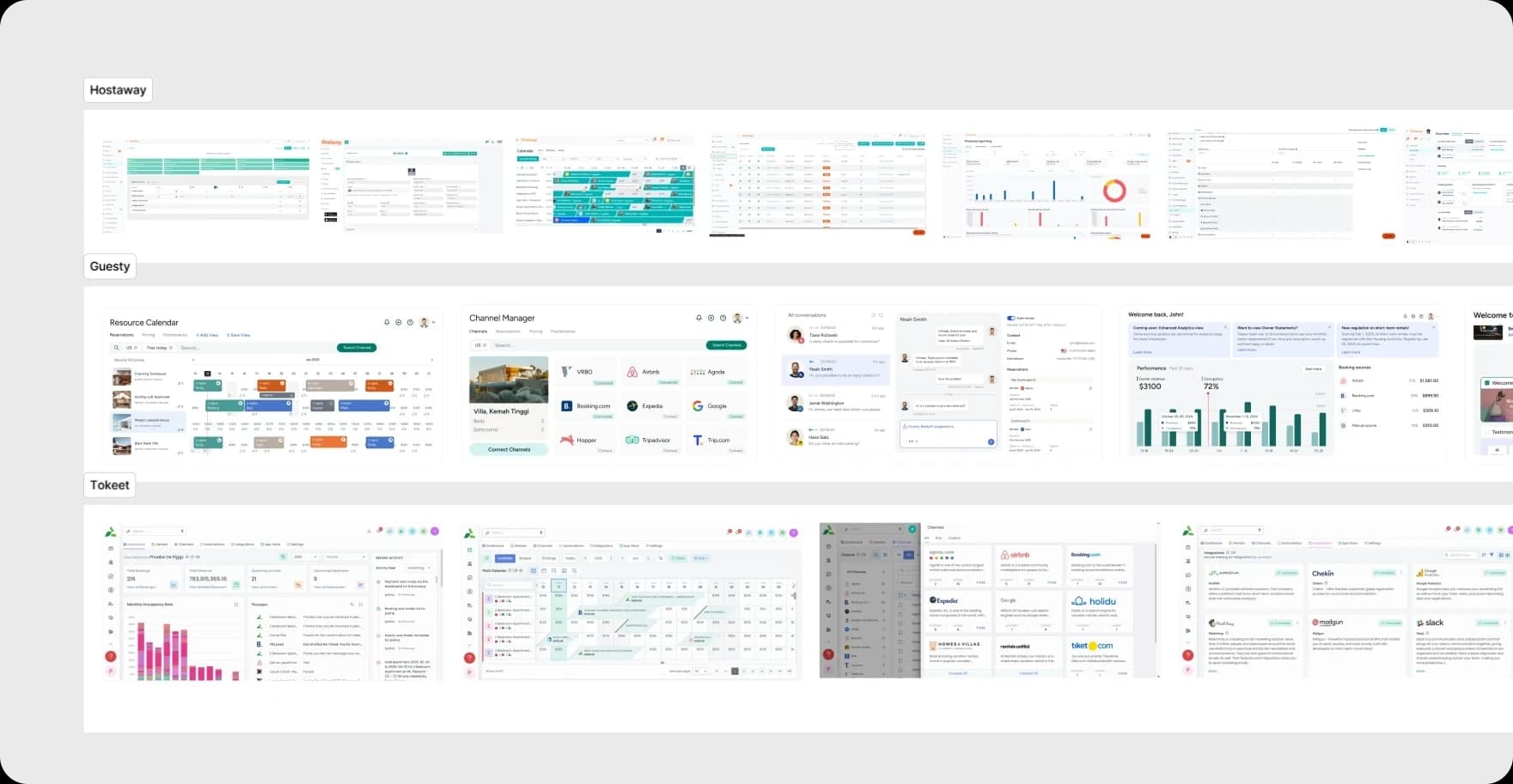
I compared Guestreply with three direct competitors on the features hosts brought up in the interviews, and went through the interfaces of three PMS: Hostaway, Guesty and Tokeet. Two of the direct competitors are PMS themselves, so I bet on tone and control over automation.
FeatureGuestreplySmartbnbYour PorterZeevouHostawayGuestyTokeet
  • 24/7 automated guest communicationDrafts only
  • Support for 80+ languagesTranslationTranslation
  • Customizable brand tone
  • PMS integrationIs a PMSIs a PMSIs a PMS
  • Review response automationAI draftsManual
  • AI-powered upsellingVia partners
Smartbnb, Your Porter and Zeevou as they were during the research. Hostaway, Guesty and Tokeet checked against their public help centres in September 2026.
Screens of Hostaway, Guesty and Tokeet: calendars, channel managers, inboxes and dashboards
Hostaway, Guesty and Tokeet: calendars, channel managers, inboxes and dashboards I went through.

Personas

A private host answers from a phone between other work. A company's operations manager clears a queue at a desk all day. Both use one product and expect different things from it.

Private host · 2–5 apartments

Answers alone, from a phone

Goal
Don't lose bookings to slow replies, and sleep at night.
Fear
The bot says something wrong about check-in, and the host answers for it.
Taken into the product
Scheduled autopilot, running on listing facts only. A mobile inbox.
Operations manager · 40–150 listings

Clears the queue during a shift

Goal
Clear the queue fast, miss nothing and answer in one company voice.
Fear
AI politely answers a complaint a human should have seen.
Taken into the product
A queue of drafts, the booking next to the conversation, escalation, a choice of tone.

The buyer is a third person: the owner of the management company, who never answers guests. For them I made the website with a demo request form and a ten-slide sales deck.

Hypotheses

A host pays for a guest getting an accurate answer fast. So I proposed the median time to first reply as the main metric, and measured trust in AI by what people did: drafts sent without edits and listings moved to autopilot. With the CTO we set up these events in Mixpanel before the beta.

  1. H1If a draft is ready when the manager opens the conversation, with the booking next to it, the first reply in the daytime gets faster than 15 minutes.MetricMedian time to first reply in working hoursHow it was checkedMixpanel during the beta against a conversation export from before the connection
  2. H2If autopilot has clear limits (listings, booking stage, hours), half of the beta companies switch it on in the first 30 days.MetricShare of companies with autopilot on at least some listingsHow it was checkedMixpanel, 30 days after autopilot launched
  3. H3If listing facts live in separate fields instead of free text, drafts go out without edits more often.MetricShare of drafts sent without editsHow it was checkedA month before and a month after the fields, plus tagging the reasons for edits
  4. H4If people can pick the reply tone from examples, there will be fewer edits, since tone is what people will fix most.MetricShare of edited drafts and the reasons for editsHow it was checkedTagging edits by hand
  5. H5If AI writes part of the replies, guests won't rate their stays lower. Speed must not cost quality.MetricAverage rating of beta listingsGuardrailHow it was checkedRatings from the PMS, before and after

Autonomy ladder

This is the central decision of the project. Hosts aren't against automation in general. They are against automation they can't see and can't limit, so I made a ladder of autonomy: AI gets more freedom only where the host has allowed it.

  1. 1 of 4OffDeactivate
    What AI does
    Nothing. A person writes
    What the human controls
    Everything
  2. 2 of 4DraftDefaultPending AI Response
    What AI does
    Writes a reply and waits for a person
    What the human controls
    Send, Modify, Escalate or Delete for every reply
  3. 3 of 4Autopilot within limitsAutomation
    What AI does
    Sends on its own, only from listing facts
    What the human controls
    Listings, booking stage, working hours, delay before sending
  4. 4 of 4Full autonomyNot built
    What AI does
    Decides on money itself: discounts, refunds, late check-out
    What the human controls
    Nothing in the moment. That's why we didn't build it

In the first prototype autopilot was a switch on every listing row. With 60 listings that's 60 switches, and a row can't say “only at night”. So autopilot got its own Automation page with a safe default for every limit, and switching it on is confirmed in a separate window. Complaints, money and conflicts never go to autopilot, and without enough listing facts the conversation gets a “needs a human” marker.
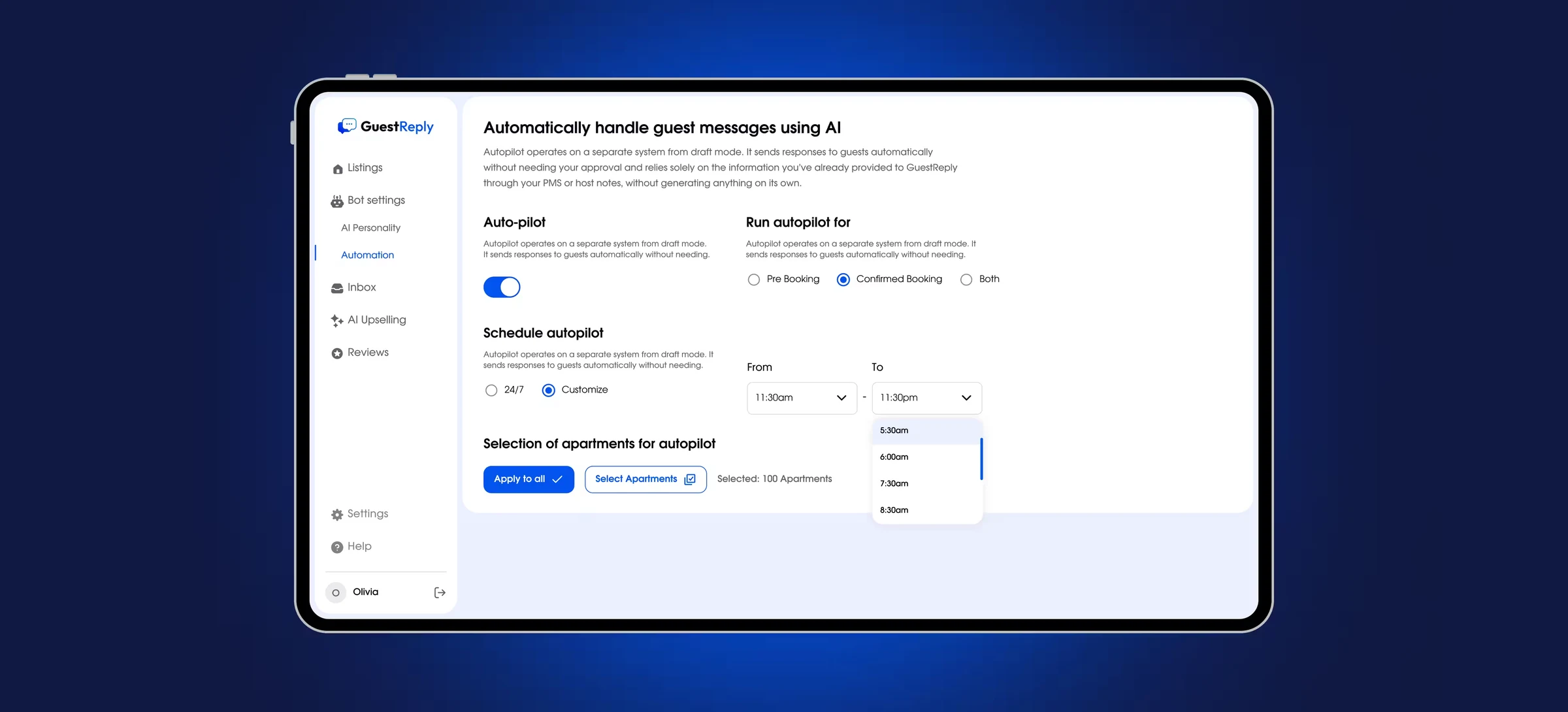
Autopilot settings on a tablet: booking stage, schedule, listing selection
The Automation page. The first line says it plainly: autopilot answers only from information the host has already given Guestreply and never makes anything up.

Inbox

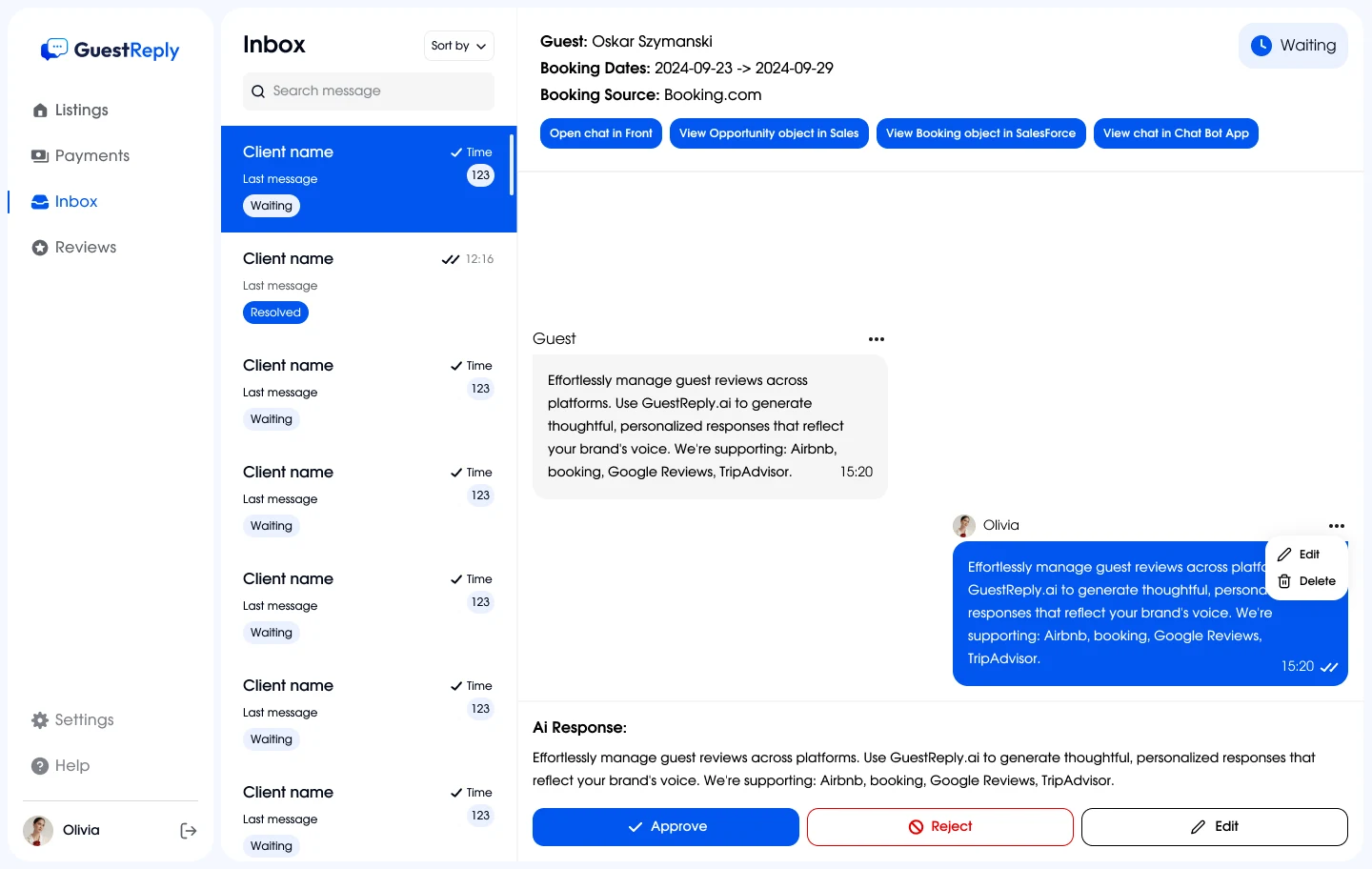
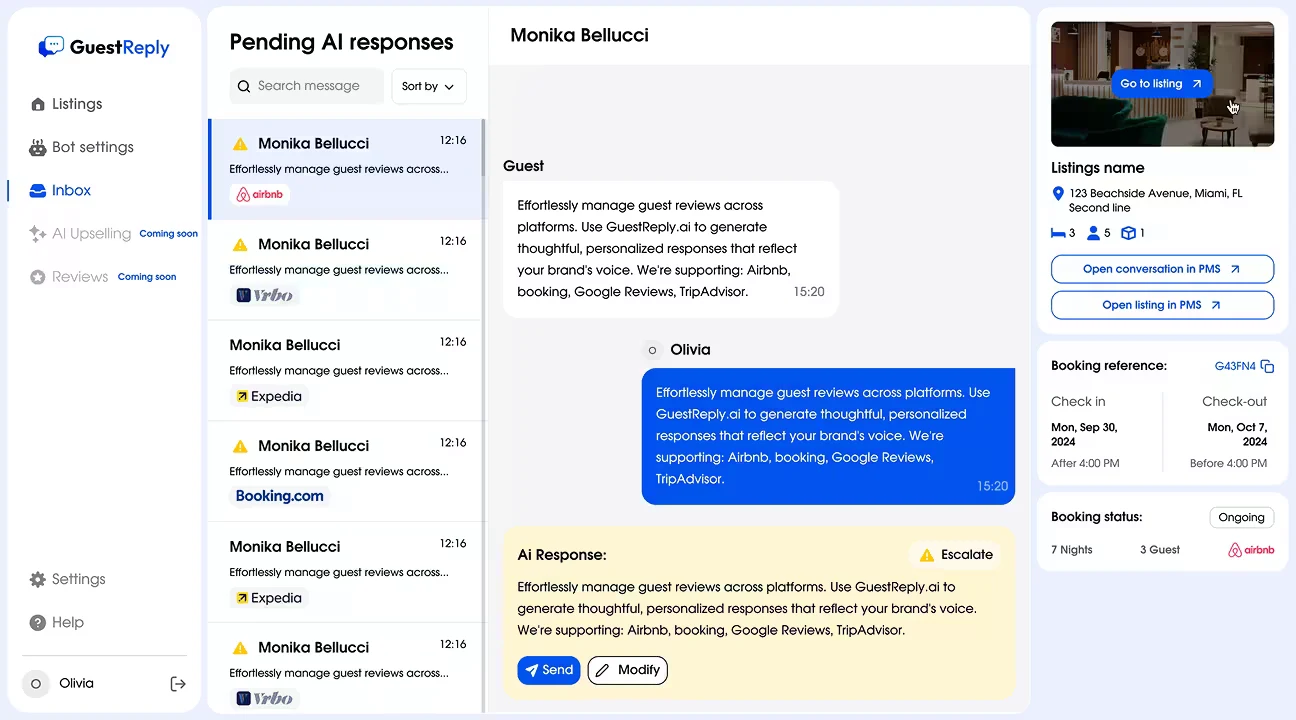
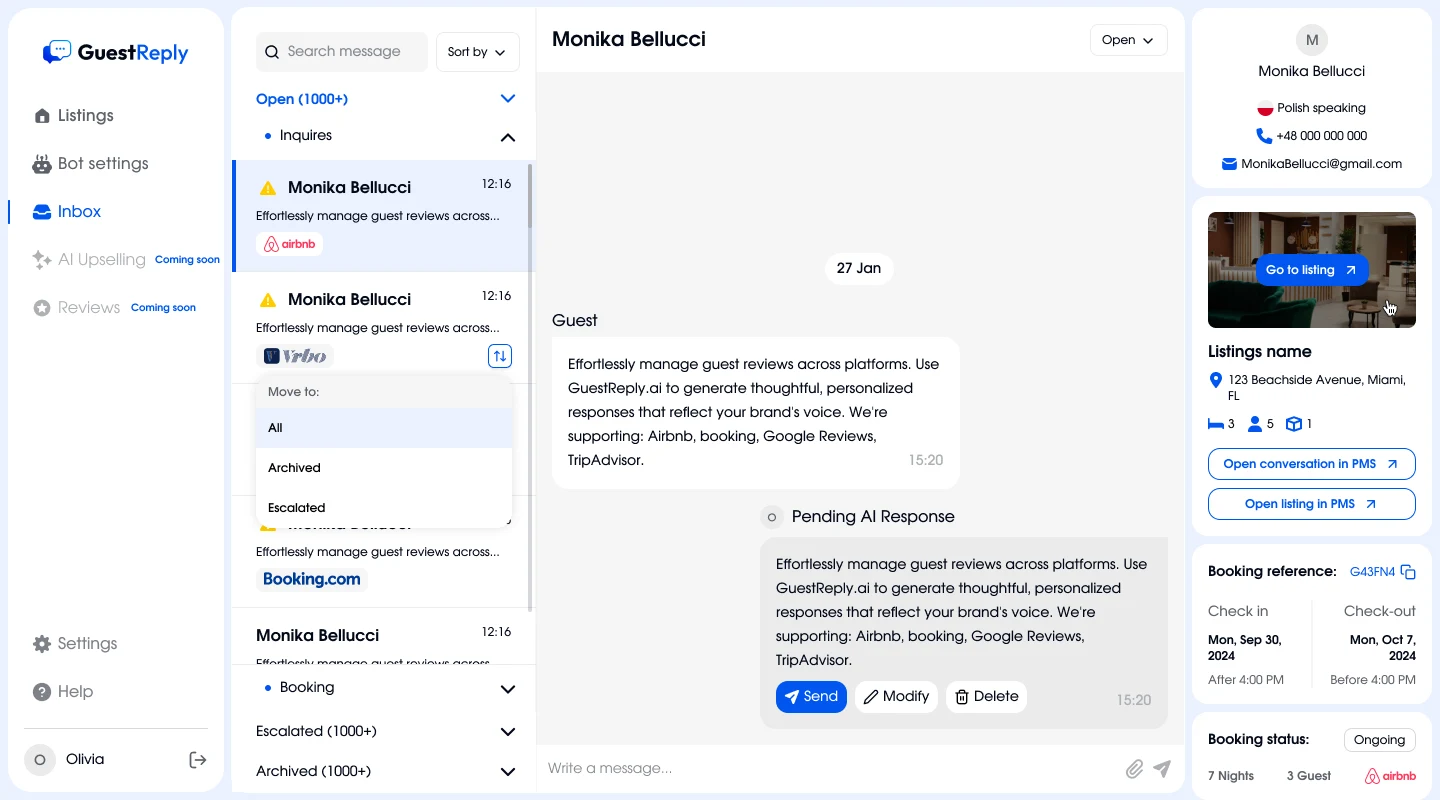
I drew the first inbox for the stack of the first pilot company: booking data as a header line and buttons into their Front and Salesforce. That worked for one client only. In the final version the guest, the listing, the dates and the booking status sit in a permanent panel on the right, whichever PMS the company uses.
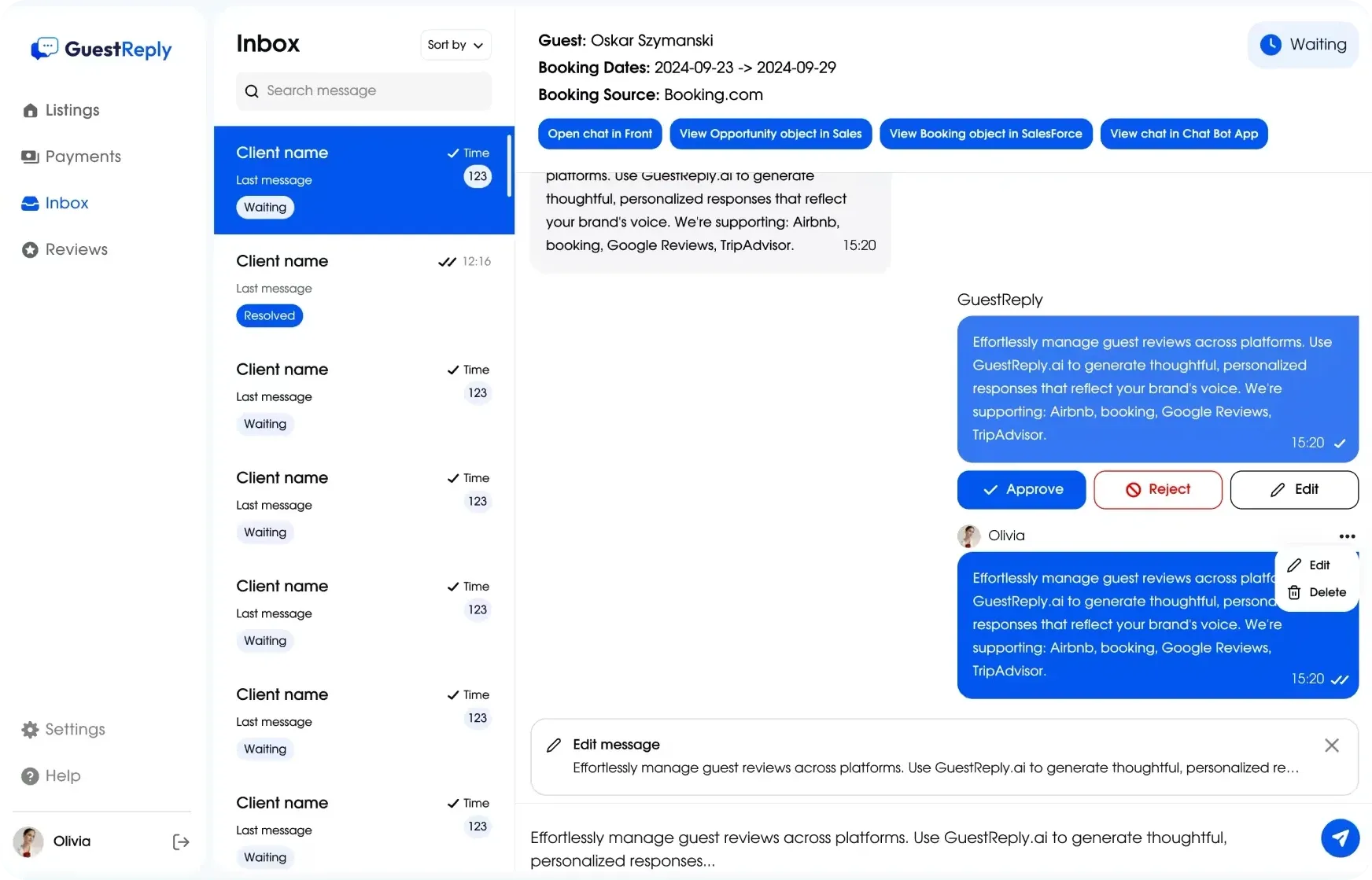
Early inbox: the booking in the header and buttons into Front and Salesforce
Before: the booking as a header line, jumps into one client's tools.
Final inbox: the list with groups, the draft and the guest and booking panel
After: the list on the left, conversation and draft in the middle, guest, listing and booking on the right.

Pre-booking requests and conversations on confirmed bookings sit in separate groups, since their urgency differs. Every message is translated, and the reply goes out in the guest's language.

AI draft

A reply that AI has written and not yet sent is what I reworked most. Three versions, two tests.
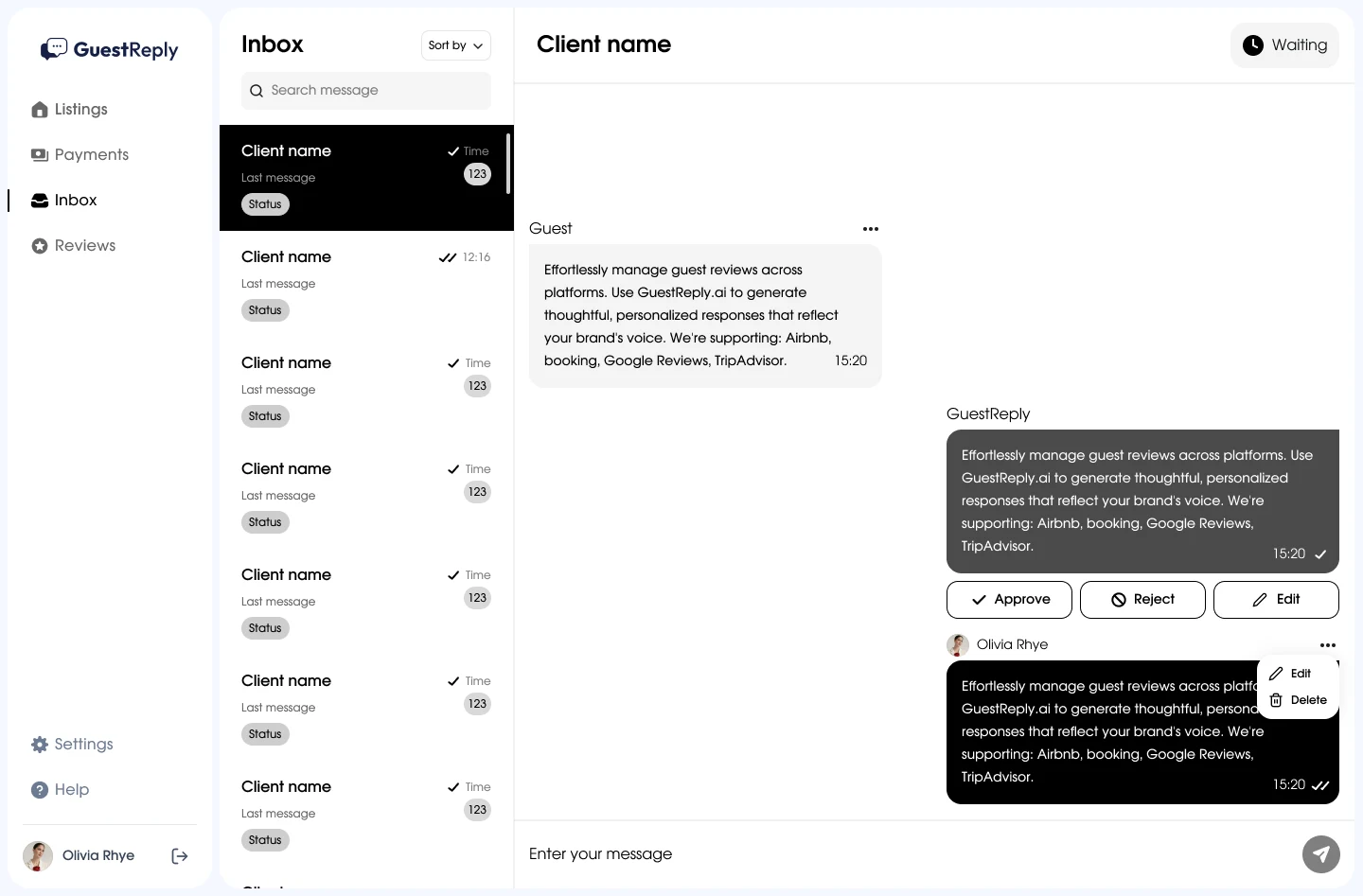
  1. Prototype: the draft in the feed as a message with Approve, Reject, Edit
    Month 1 · prototypeA draft in the feed

    The AI reply looks like a regular message, with Approve, Reject and Edit under it.

    What testing showed: Managers read the draft as already sent to the guest.
  2. Second version: an AI Response block under the conversation with Approve, Reject, Edit
    Month 2 · first beta versionA block under the feed

    The draft is separated from what was sent. This is what went into the beta.

    What testing showed: Reject was unclear: after it the guest was left without an answer, and nobody saw that.
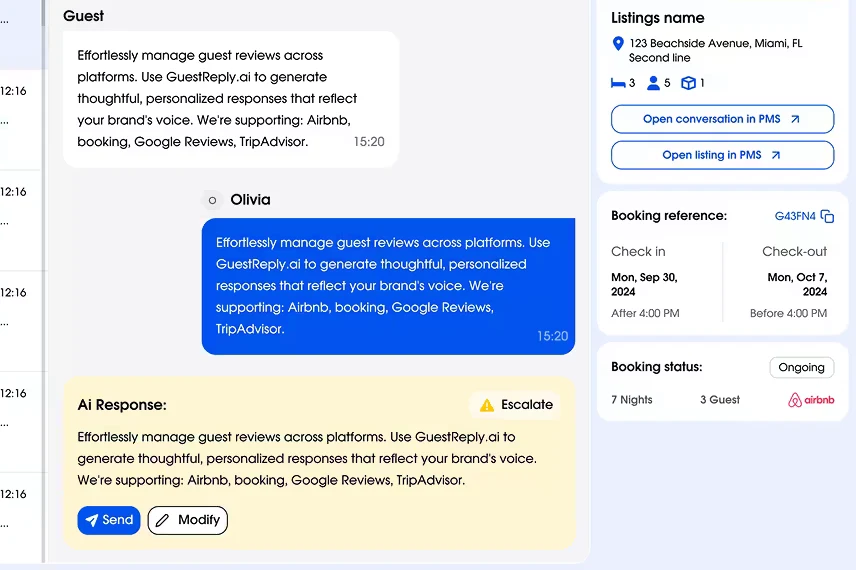
  3. Final version: a yellow AI Response block with Send, Modify and Escalate
    Month 3 · final versionA queue and a yellow draft

    Yellow means “not sent yet”. Modify and Escalate replaced Reject, so every action says what happens to the guest.

    What testing showed: After the change, a guest was never left silently without an answer: the draft either went out or landed in Escalated.

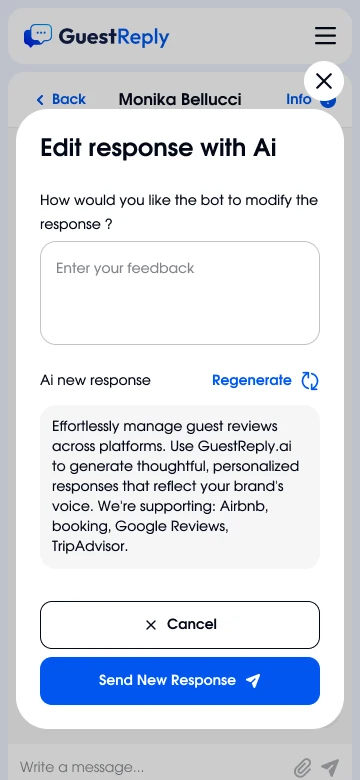
In an early version a fix was a plain field, and people deleted the whole draft to write their own. With Modify the manager tells the bot what to change and presses Regenerate. A separate Send New Response button keeps an edit from reaching the guest by accident.

Listing data

The research showed that answer accuracy depends on the listing facts. So a draft is assembled from three layers, and each has its own owner.
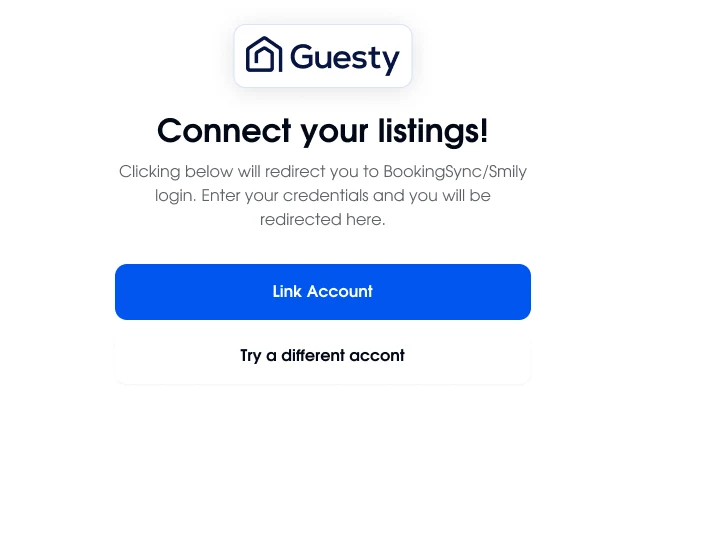
Connecting a Guesty account
PMS

Booking, dates, guest, address. Connected at sign-up by an account login or an API key, synced on its own.

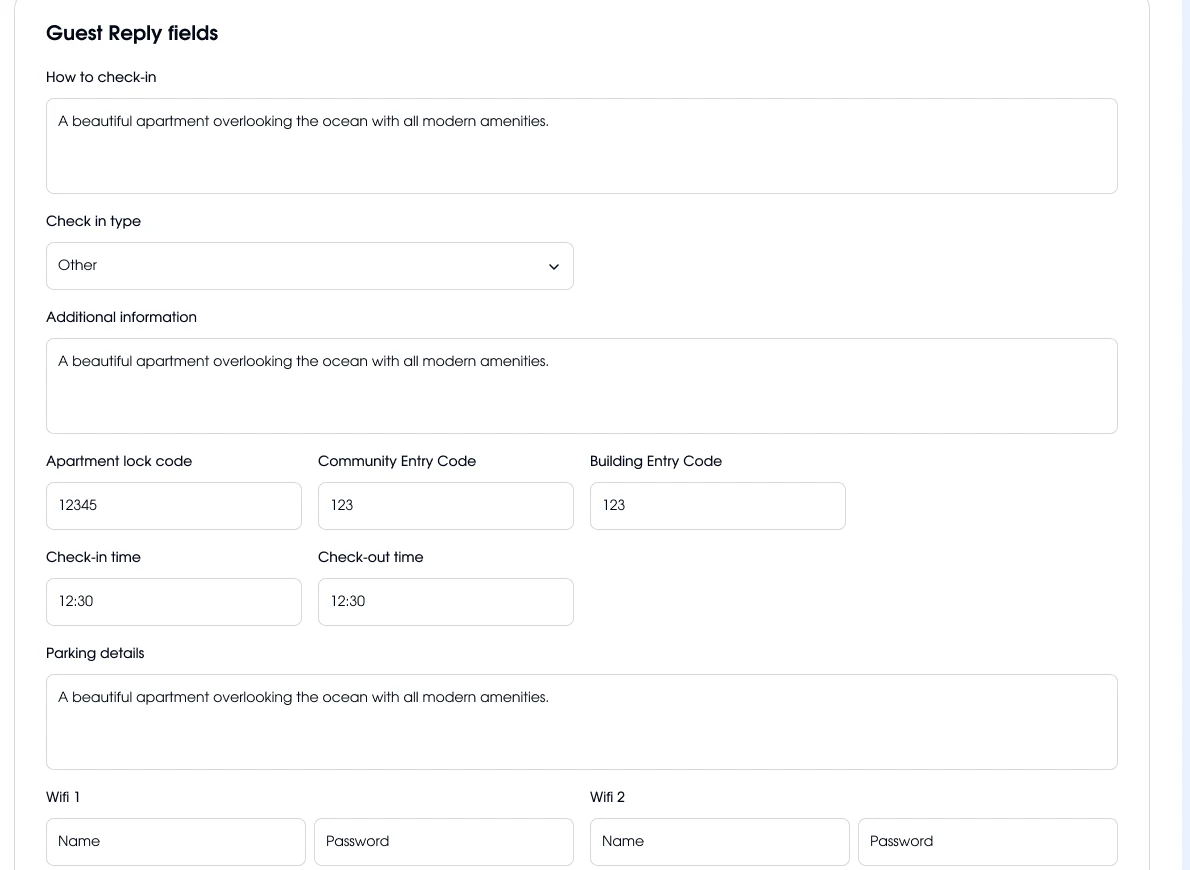
Guest Reply fields in the listing card
Listing fields

What the PMS doesn't have: how to get in, codes, parking, Wi‑Fi. Separate fields, so AI doesn't mix up the entrance code and the door code.

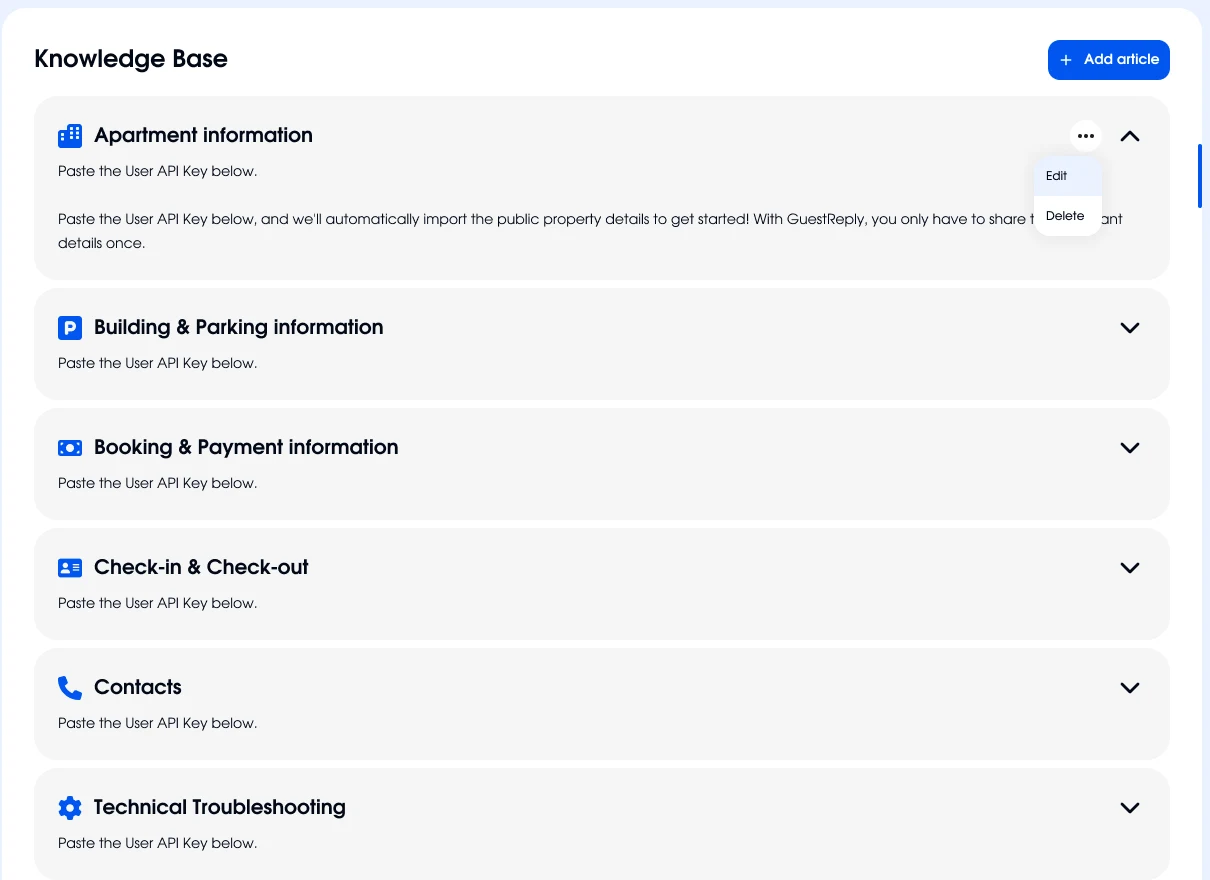
Knowledge Base with sections by topic
Knowledge Base

What applies to every listing of the company: house rules, payment, contacts. Written once.

AI draft next to the booking
Draft

AI answers only from these three sources. If the answer isn't there, the conversation goes to a person.

Next to Sync now the card shows when data last came from the PMS, so the host knows how fresh the AI's facts are.

Mobile and design system

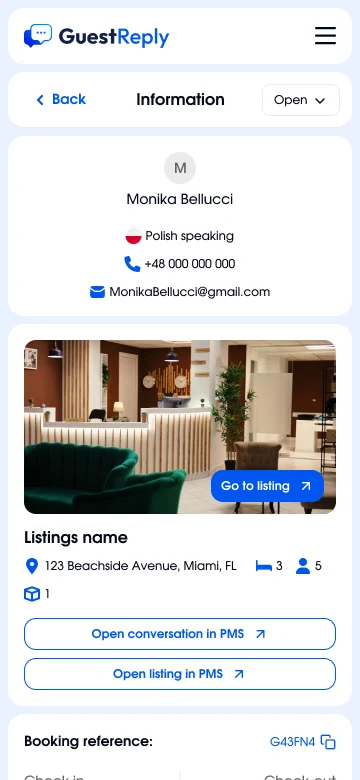
On a narrow screen the booking panel moves to its own Information screen. The draft, the translation and Modify work the same as on desktop.
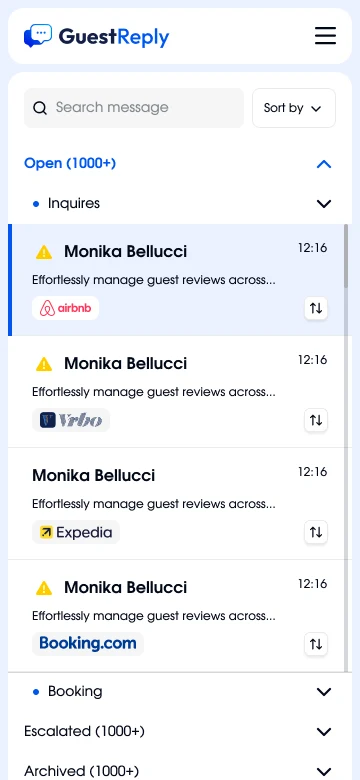
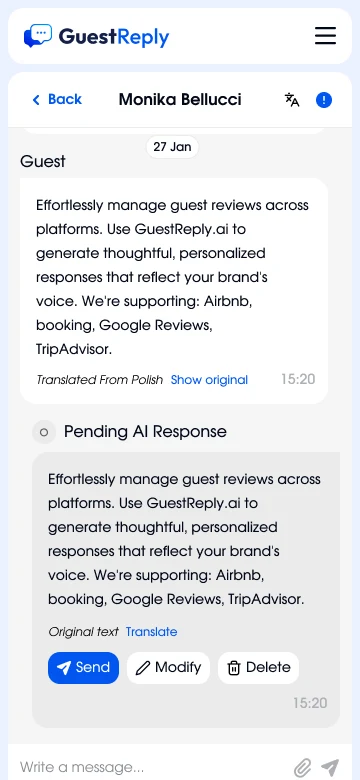
Mobile list of conversations
Inbox
Mobile conversation with translation and draft
Draft
Mobile window for editing a reply with AI
Edit with AI
Mobile guest and listing information screen
Guest info

Guestreply had no brand, so I made the logo and the palette alongside the prototype. Blue means action and selection, yellow is reserved for what hasn't reached the guest yet. The UI designer detailed the components, I set the rules: required states, behaviour at 360 px, AA contrast, a visible focus and touch targets from 40 px.

Launch

In an AI product a designer can't draw behaviour without knowing what the model can do. With the ML engineer I defined which messages always go to a person: complaints, money, missing data. The UI designer joined in month two and every screen went through my review, and the developers came to wireframe reviews to catch PMS limits early.

  1. Month 2
    Closed betaDrafts only, no autopilot. Most edits were about facts.
  2. Month 3
    Autopilot and its first weekSome companies switched autopilot off within days: it answered while a manager was typing, and the guest got two messages. I added Auto-pilot delay: autopilot waits the set minutes and stays silent if a person answered.
    New draft and listing fieldsSend, Modify and Escalate instead of Approve and Reject, plus separate fields for codes, Wi‑Fi and parking. They shipped in the same month, so I separate their effects carefully.
  3. Month 4
    Open sign-upThe trial, per-listing billing, the mobile version and the website with the demo request.
  4. After launch
    Next stageReviews and AI Upselling designed and shown to clients as Coming soon.

Results

92%
of AI drafts sent by managers without editing, counted from the logs over 500+ live messages

That share is what made it possible to hand routine categories to autopilot. Discounts, rule exceptions and disputes stayed in review permanently.

Where I went wrong

  • I brought in the ML engineer too lateI spent a long time drawing an AI confidence indicator next to the draft, and then it turned out the model gives no reliable estimate. Escalation rules replaced it, and the time was lost.
  • I invested too much in the tone choicePeople fix facts. It was visible already in the conversation review, had I looked at the edits.

Next steps

  • Offer autopilot per listingWhen a listing's drafts go out untouched for several weeks in a row, suggest autopilot for it. The trust is already earned, it only needs to be noticed.
  • Channels and scaleWhatsApp as a channel, assigning conversations to staff for large companies, and launching the reviews that are already designed.

More work